AI Coding for Beginners: My 15-Hour Quest to Design a Hong Kong Big Two Game with ChatGPT
Why I Tried AI Coding for Beginners with a Local Game
I had two big ideas fueling this. First, I wanted to see if ChatGPT (GPT-3o-mini-all) could design a game from scratch with me acting like a coding beginner—mostly prompting, barely coding. Second, I was curious if an LLM could nail Hong Kong Big Two, a local card game that’s less hyped than poker but a blast here. Could it craft the mechanics and play it well? I set up three AI opponents powered by the LLM, keeping my Python skills (decent, but not game-design pro) on a leash to mimic a newbie—though I slipped into designer mode once, as you’ll see! This was all about AI+Design—merging tech smarts with game-crafting creativity.
Crafting the Game: A 15-Hour Dance of Code and Design with ChatGPT
I kicked off with, “Do you know the Hong Kong Big Two card game and its rules?” ChatGPT said yes, so I hit it with, “Let’s design a mini game based on Big Two.” Out came a Pygame draft, launching a 15-hour whirlwind of testing, prompting, and designing—peak ChatGPT game development. My flow? Play the game, spot a flaw (mechanics or looks), and nudge ChatGPT to fix or enhance it. Dozens of iterations later, it started looking like a real Hong Kong Big Two (鋤大DEE / 鋤大弟) game.
Here’s the catch: ChatGPT didn’t nail the game design in one go. Big Two lets you play singles, pairs, triples, or five-card combos (straights, flushes, etc.), depending on what’s out. First version? Singles only. I was floored—it knew the rules but didn’t design them in. I turned into the game designer: “Add pairs.” Test. “Now triples.” Test. “Okay, five-card combos.” Prompts like, “In Big Two, a pair is two same-rank cards—update the logic,” got it tweaking get_combo_type and is_valid_play_move. It was slow, but a solid lesson in how to use ChatGPT to code a card game.
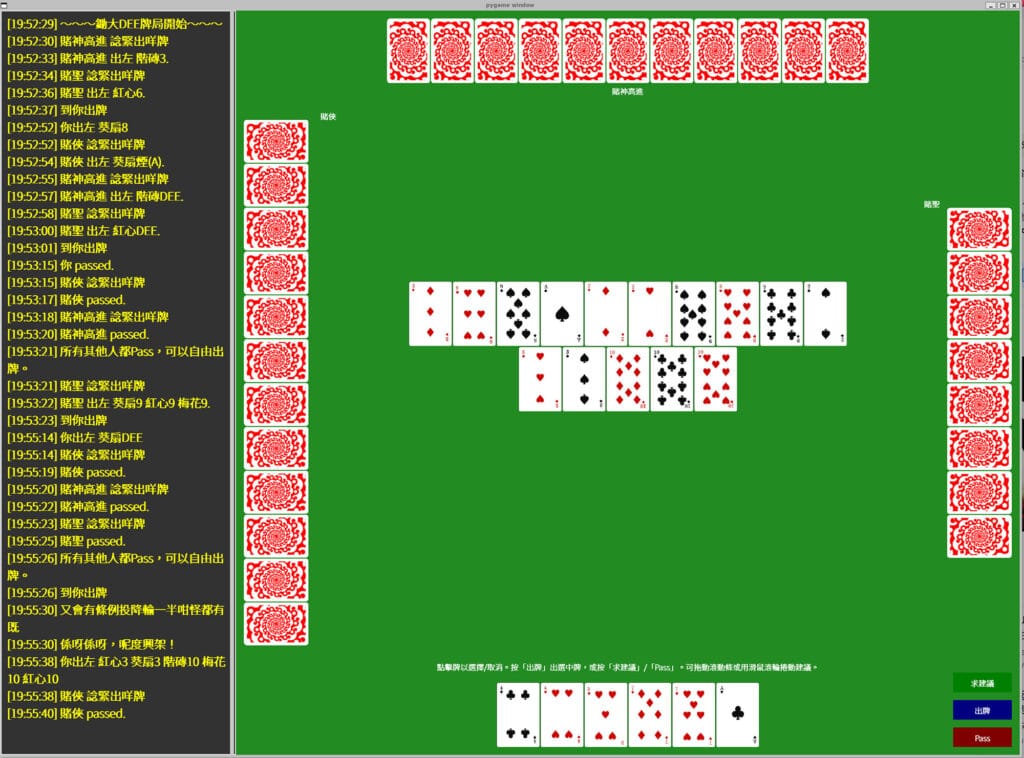
The design hiccups really shone with the visuals. I envisioned played cards stacking in neat, centered rows on the table—a clean, playable look. I prompted 5-6 times—“Make cards stack in rows, centered horizontally and vertically”—but got a vertical column hugging the top. I’d push, “Rows, not columns, center them!” It’d adjust a bit—still wrong. After banging my head on prompts, I snapped. My inner designer took over, and I dove into draw_screen, tweaking table_start_y and row_start_x to center those rows myself. It took 20 minutes and broke my “no coding” rule, but the game’s look finally clicked.
The Finished Design: A Playable Hong Kong Big Two Game with AI Flair
After 15 hours, I had a Hong Kong Big Two game that’s honestly pretty cool! Your hand sits at the bottom, AI hands (hidden) frame the edges, and played cards stack center-table in rows—thanks to my tweak. An advice widget on the left dishes Cantonese tips from the LLM, and buttons let you play, pass, or ask for help—all designed with Pygame. It nails the “3D” start rule and flips to free-play after three passes. Empty your hand, and bam—victory!
But it’s not perfect. Here’s the full scoop:
- “Dumb” AI Opponents: The AI, driven by ai_make_move, isn’t a design masterpiece. I prompted it hard—“Play high when someone’s at one card, think ahead”—but it’s sloppy, passing when it could snag a win. I tested different models, from gpt-4o to deepseek r-1, and kept refining prompts. Still meh—functional, not genius. A newbie might not care, but it bugs me as a designer.
- Design Grew Rule-by-Rule: ChatGPT didn’t design all the rules upfront. First draft? Barebones—singles, no “3D” (a rule that forces the one with Diamond 3 to play first, and one must play Diamond 3, or a combo comprising Diamond 3, in this case), no five-card flair. I had to prompt each mechanic, which surprised me. I expected a rough but complete design, not a blank canvas.
- Visual Design Struggles: That table layout? A design disaster via prompts. Text like “center the cards” didn’t cut it—I had to code it myself. Screenshots might’ve saved me for next time’s ChatGPT game development. Without my fix, it’d be unplayable.
- Code Design Flaws: My Python side spotted inefficiencies. For example, in
ai_make_move, there’s acurrent_moveparameter that’s unused.
def ai_make_move(ai_hand, current_move, ai_name="AI"):However, it leans on game_state.last_table_move instead:
if not game_state.last_table_move and "3D" in ai_hand:
forced = Truecurrent_move? It works since they align, but it’s sloppy design. A beginner wouldn’t notice—I did, and it’s a itch I can’t scratch. Other spots, like repeated draw_screen math, could be slicker too. While testing, I noticed the game could get stuck because the LLM wasn’t smart enough—sometimes it’d try to play illegal cards, like a pair when a triple was required. Frustrated, I turned to ChatGPT, asking it to solve this AI coding for beginners snag. It suggested a fallback function—ai_fallback_move—which was designed to use a rule-based method to pick a legal card. It’s not genius-level AI, but it keeps the game flowing, blending ChatGPT game development creativity with a fix I sparked and the LLM helped shape.
To spice up the Hong Kong Big Two game and make it a true blast, I tossed in some random quotes from classic Hong Kong gambling movies—like God of Gamblers (賭神). Every few minutes, the AI might blurt out gems like ‘五條煙!’ (Five aces!), ‘又會有條例投降輸一半咁怪都有既!~~係呀係呀,呢度興架!’ (Even a weird rule like surrendering and losing half exists! ~~ Yes, yes, it’s the norm here!), or ‘今次重唔捉到你呢隻老狐狸!’ (This time I’ll catch you, old fox!). It’s a nod to the city’s cinematic gambling legacy, blending AI coding for beginners with a dose of nostalgic fun. ChatGPT helped me code this quirky feature, proving it’s not just about logic but also creativity in ChatGPT game development!
To further give players a leg up, I also designed an advice feature powered by the LLM—hit the ‘求建議’ (Ask for Advice) button, and ChatGPT suggests which cards to play based on your hand and the table. It’s a cool AI coding for beginners perk, dishing out Cantonese tips like a gambling mentor. But, just like the AI opponents, the advice isn’t perfect—sometimes it’s oddly cautious or misses the winning move. I prompted hard to sharpen it, feeding it strategies like ‘play high when they’re low on cards,’ but no luck—it’s helpful, not brilliant. Still, it’s a fun design twist that shows ChatGPT game development can blend logic with a bit of personality!
When AI Design Hit a Wall: My Hands-On Fix
draw_screen, nailing the centered rows. It worked, but it was a cheat—prompting visual design is tough. Text couldn’t convey “center it right,” and I didn’t try screenshots (next time!). For a true newbie, this is where AI+Design stumbles—you’d be stuck without coding chops. What I Learned Designing with AI
Tips for Your AI+Design Journey
Ready to try AI coding for beginners with a design twist? Here’s my playbook:
- Start Small, Be Exact: Don’t design a whole game yet. Try “deal 13 cards” first. Spell out rules and visuals—ChatGPT won’t guess.
- Test Like a Designer: Play it, spot flaws, fix them. Bad layout? Say, “Cards are vertical, I want rows.” It might take tries—keep tweaking prompts.
- Learn as You Design: Ask, “What’s this for loop doing?” It’s a fast track to learning coding with an LLM.
- Roll with Flaws: Dumb AI or messy code (like current_move)? It’s part of the ride. Guide it—perfection takes time.
- Mix Your Tools: Text failing? Try screenshots for visuals. Errors? Paste them on ChatGPT—It’s a debugging whiz. Only get a Snippets? Ask ChatGPT to send full code for a marked-up fix.
- Refresh the AI: After lots of prompts, it can lag—context overload? New chat, latest code, and it’s fresh again.
Pair this with a Python basics guide—knowing a bit of syntax boosts your ChatGPT game development flow.
Wrapping Up: AI+Design in Action
This Hong Kong Big Two game was a design rollercoaster—15 hours of prompting, a hands-on visual fix, and a playable result that’s not flawless. ChatGPT delivered a game with AI flair—opponents, Cantonese tips, and a solid UI—but the “dumb” AI and unoptimized code (hi, current_move!) show AI’s design limits. For beginners, it’s not a lone path to game design, but it’s a stellar co-designer for learning.
I’m hooked—what’s next? Another AI+Design project with screenshots? Drop your ideas below—I’d love to hear what you’d design! For now, I’m leaving current_move as a quirky badge of this wild ride.
Happy designing (and maybe coding)!
Want to dive into the code? Check out the GitHub repo: https://github.com/balitoli/big2.
Please share this article if you like it!

No Comment! Be the first one.